






How To Check Your IRS Tax Refund Status
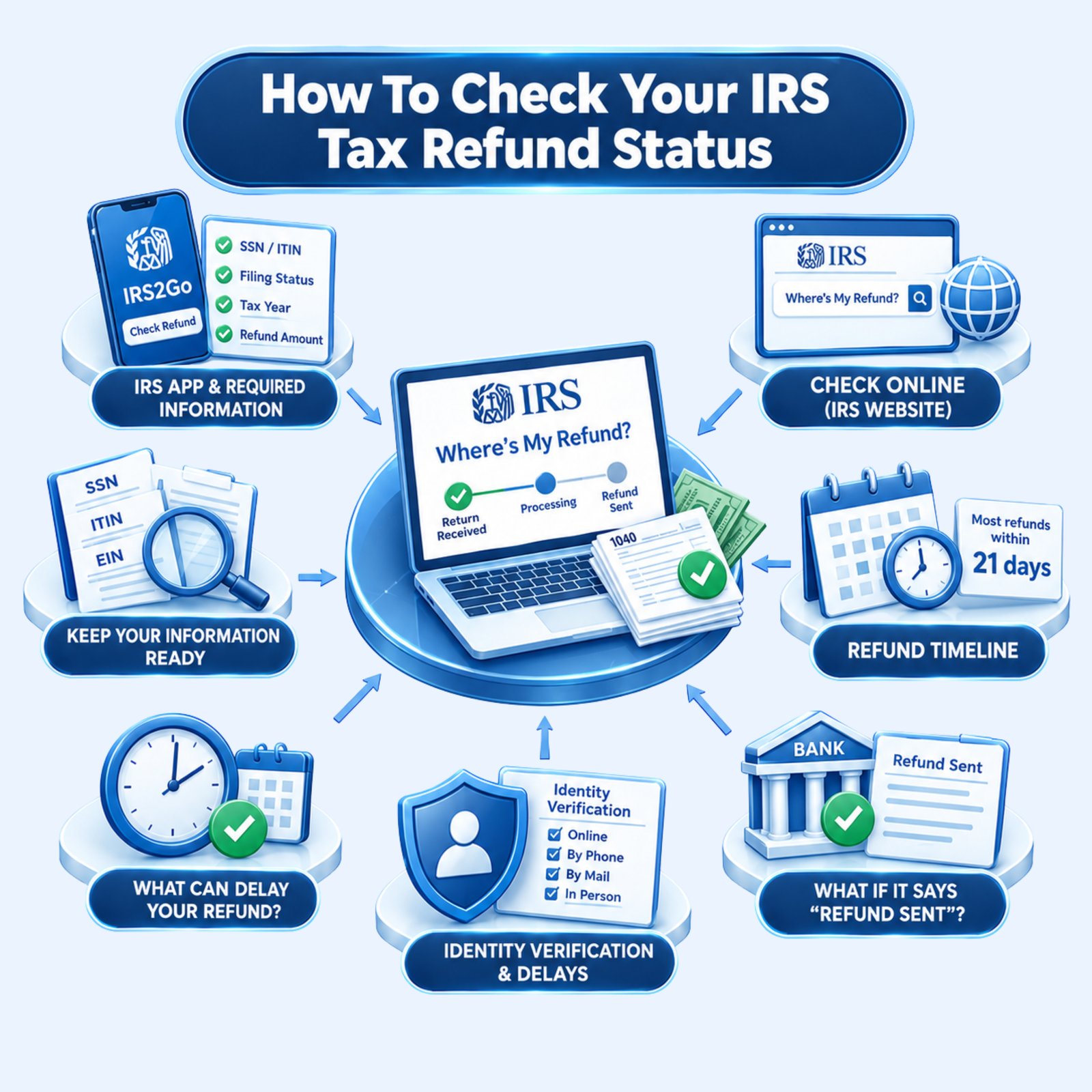
- 1 Check your refund through Where’s My Refund? or the IRS app.
- 2 Keep your SSN/ITIN, filing status, tax year, and refund amount ready.
- 3 Most refunds are issued within 21 days, but some take longer.
- 4 “Refund Sent” means the IRS has issued the payment, not that you have received it.
- 5 Identity verification or return reviews can delay your refund.
Waiting for a tax refund can leave you checking your bank account more often than you would like. Fortunately, the IRS tax refund status is easy to check online once you have the right information. The IRS Where’s My Refund? tool lets you see whether your federal tax return has been received, whether your refund has been approved, or whether the payment has been sent.
You can check your IRS refund status using your Social Security number or ITIN, filing status, tax year, and the exact refund amount shown on your tax return. The IRS also provides its official mobile app and IRS Online Account for accessing refund and tax information.
Refund timing can vary depending on how and when you filed your return & some returns need further review before the payment is released. Knowing where your return stands can help you understand what is happening with your refund instead of depending on an estimated payment date.
What Is The status Of An IRS Tax refund?
Your IRS tax refund status shows the current stage of your refund in the IRS processing system. It can tell you whether the IRS has received your tax return, is still processing it, or has sent your refund.
In simple terms, checking your refund status helps you understand where your refund is in the process & whether you need to take any further action. Your refund status can change as the IRS processes your return & gets your refund out to you.
How To Check Your IRS Refund Status With The IRS App
IRS2Go is the official mobile app of the Internal Revenue Service, enabling taxpayers to access information about their federal tax refund through a mobile device, such as a cellphone or other portable device. Where’s My Refund? Service can be used to view the latest status of your refund.
To check your refund through IRS2Go, you generally need to provide your:
- Social Security number or ITIN
- Filing status: Note the different filing statuses that are possible.
- Any filing status has its own set of rules for who can file it & how to file it.
The app links you to the IRS refund info, so you can check your current status without going to an IRS office. The IRS updates the refund info once every 24 hours, generally overnight. So if you keep checking the app all day long, it will be hard to see any new information.
If you recently filed your return it may take a little while for your information to show up in the app. If you recently filed your return you may need to wait a little while before your information appears. The IRS generally recommends waiting 24 hours after electronically filing a current-year return, 3-4 days for an electronically filed prior-year return & about 4 weeks after mailing a paper return.
What Information Do You Need to Check Your IRS Refund?
Keep a copy of the tax return you filed with you when you check your refund. You’ll need:
- Your SSN or ITIN
- Your filing status
- The refund amount, entered as a whole-dollar amount from your return
You also need to choose the tax year for the refund you want to check. Make sure the details you enter are the same as those on your tax return.
How To Check Your IRS Tax Refund Status Online?
One of the most helpful methods for checking your IRS tax refund status is using the IRS website.
Follow these steps to check your IRS refund status online:
1. Open The IRS Refund Status Page
Visit the official IRS website & open the Where’s My Refund? tool. This is the IRS’s online refund tracker for checking the status of your federal income tax refund.
2. Enter Your Tax Information
The refund tracker uses the information from your tax return to find your refund status. Normally you will need to fill in:
- Social Security Number (SSN) or Individual Taxpayer Identification Number (ITIN)
- Filing status, such as Single, married filing jointly or Head of Household.
- Tax year for the return you are checking.
- Exact refund amount displayed on your tax return.
Make sure the information you entered matches the information on your filed return. An incorrect refund figure or other information may stop the system from showing your refund status.
3. Submit The Information
When you input all the needed data, send it by using “Where’s my refund?” Tool, the IRS will display the latest refund information they have about your return.
If you have just turned in your tax return, it may take some time before your info is on file. Here is how fast you will be able to see your IRS tax refund status based on how you file.
4. Check Your IRS Refund Status
The IRS refund tracker shows your refund status up to date as & when your information is available. These statuses are
- Return Received: The IRS has received your return & is processing it.
- Refund Sent: The IRS has released your refund & you are receiving it.
- Your refund has been Sent: The IRS has sent your refund to your bank account, although it may still take a few days to reach your bank account or be delivered through the mail.
Your refund status may be altered as the IRS processes your return. When will you receive your refund? The IRS may take longer to process your return if it requires additional information or is subject to further review.
Tip: Use the official IRS Where’s My Refund? tool for the most reliable information about your federal tax refund rather than relying on unofficial refund-tracking websites.
How Long Does An IRS Tax Refund Take?
Most refunds arrive in less than 21 days, but there is no fixed time for every tax return. The IRS may take longer when it needs to correct an error, get missing information, or review the return. E-filed returns usually move through processing faster than paper returns.
Refunds that include the Earned Income Tax Credit (EITC) or Additional Child Tax Credit (ACTC) follow a different timeline. By law, the IRS must hold the full refund until at least mid-February. Where’s My Refund? Status can show a specific refund date when the IRS has one available.
What If Your IRS Refund Shows As Sent But You Haven’t Received It?
Seeing “Refund Sent” does not always mean the money is already in your account. If you chose direct deposit, check with your bank to see whether the payment is pending or has been received. If the deposit still hasn’t shown up, you may need to ask the IRS to trace the payment.
If you are waiting for a paper check, please allow some time for it to arrive by mail. If you never receive it, or if the check is lost, stolen, or destroyed, you can ask the IRS for a replacement. For eligible mailed refunds, an online replacement-check claim can generally be started after more than 28 days from the mailing date.
What If The IRS Asks You To Verify Your Identity?
The IRS may pause processing your return until you verify your identity & confirm that you filed the return. If you receive a verification notice, follow the instructions in it. The IRS may ask you to verify your identity online, by phone, by mail or in person depending on the notice you received.
Your refund may take longer while the IRS reviews the information you provide. After you complete the verification process, the IRS will continue processing your return. The time needed can vary, so follow the instructions in your IRS notice for information about what happens after verification.
Sources Used to Prepare This Article:
1. IRS (Refunds / Where’s My Refund?)
2. IRS (Official IRS App)
3. IRS (About Refunds)
4. IRS(EITC/ACTC Refund Timing)
5. IRS (Verify Your Return)
Frequently Asked Questions
How can you check your IRS tax refund status?
Your federal refund status is available through the IRS Where’s My Refund? tool. Enter the tax details requested on the page to see whether the IRS has received your return, approved the refund, or sent the payment. IRS2Go also provides refund status information.
When can you check your IRS refund status after filing?
A current-year return filed electronically can usually be checked after 24 hours. Previous-year electronic returns may take three or four days to show up. For a paper return, wait about four weeks before looking for an update.
What information do you need to check your IRS refund?
Keep your tax return nearby because the IRS asks for your SSN or ITIN, filing status, tax year, and refund amount. The refund figure must match the whole-dollar amount on your return. Entering different information can prevent the system from finding your return.
What does “Refund Sent” mean on the IRS refund tracker?
“Refund Sent” tells you that the IRS has released the payment. With direct deposit, the money can take a little longer to appear in your account after the IRS sends it. A paper check will take additional time to arrive by mail.
How long does an IRS tax refund usually take?
For many taxpayers, the refund comes within 21 days of filing. That time can stretch if the return has an error, information is missing, or the IRS needs to review it. Refunds that include the EITC or ACTC are subject to a separate legal hold period.
What happens if the IRS asks you to verify your identity?
Follow the directions in the notice you received from the IRS and use the verification method listed there. Processing of your return can remain on hold until the verification is completed. After successful verification, the IRS says some returns may take up to nine weeks to process.

Check Your IRS Refund Status: Complete Guide
Learn how to check your IRS tax refund status online or through IRS2Go, what information you need, refund timelines, and what different status updates mean.
Get IRS Refund Guidance